


COSMO ERP Data Integration Framework: Data Management Software for Microsoft Dynamics 365 Business Central
Streamline data exchange across systems, platforms, and companies with COSMO ERP Data Integration Framework — a no-code/low-code solution built for modern enterprises.

Dynamics 365 Data Integration for Clean, Reliable Data Processes
If your business runs multiple entities, locations, or systems, you already know the pain: the same master data maintained in several places, Excel files circulating by email, and no single source of truth. Manual data transfers drain time, create frustration, and erode data quality. For mid-sized businesses especially, keeping data clean is rarely a priority when day-to-day operations demand constant attention.
That's where COSMO ERP Data Integration Framework comes in — built directly into Microsoft Dynamics 365 Business Central. This data management tool automates the import, export, and synchronization of master data and documents, delivers transparent audit logs, and connects XML, JSON, SharePoint, and additional sources to your ERP.
The result: data exchange, data harmonization, and recurring integration tasks become a seamless background process — one that keeps your operations moving instead of slowing your team down.
How COSMO Data Integration Framework Tackles Your Biggest Data Challenges

Manage Intercompany Data Flows Across Business Central Entities
With COSMO ERP Data Integration Framework, you manage intercompany data flows across multiple Microsoft Dynamics 365 Business Central entities from a single, transparent control point.
The intercompany extension supports document flows across different topologies — ring, mesh, or hub-and-spoke — connecting systems via Azure File Storage or web service.
Mappings, record pools, sequences, and notifications ensure that documents flow consistently, traceably, and automatically between companies. No matter how many countries, entities, or organizational structures you manage, this data integration software keeps you in full control of your intercompany processes.
Features
Support for multiple Microsoft Dynamics 365 Business Central versions — back to NAV 2013
2013 The Dynamics 365 Data Integration Framework connects Business Central generations from NAV 2013 to the current SaaS version. Purpose-built for complex, grown landscapes and phased migrations.
Powerful, versioned mappings for master data and documents
Mappings define how data is read, transformed, and written. Versioning simplifies changes, testing, and rollbacks — keeping master data sync, document exchange, and data migration fully under control at every step.
No-code/low-code configuration — no custom development required
Data transfer logic is configured, not coded. Business teams can freely map fields, tables, and records, set conversion rules, and manage the data management software — without touching core code.
Extensibility via custom code units and business logic
When needed, plug in your own code units before or after specific process steps — for validations, plausibility checks, or customer-specific business rules integrated directly into data processing.
Support for multiple data sources and formats (XML, JSON, SharePoint)
The Dynamics 365 Data Integration Framework reads and writes data from Microsoft Dynamics 365 Business Central, SharePoint, XML and JSON files, and custom endpoints — making it the central hub between your ERP, portals, and third-party systems.
Sequences, record pools, and transport types for complex workflows
Sequences orchestrate multiple mappings, transport types, and conversions in the right order. Record pools log changes and enable incremental data transfer.
Comprehensive logging and error analysis for interface operations
Every mapping run is logged in the data management software. Detailed logs, status overviews, and a notification system help you spot errors fast, investigate root causes, and resolve issues for good.
Intercompany extension for cross-entity processes
The COSMO Intercompany Extension leverages the Data Integration Framework to exchange documents and master data between companies — including automated approval, posting, and a granular permissions model.
Take a look—here's how the system works in practice
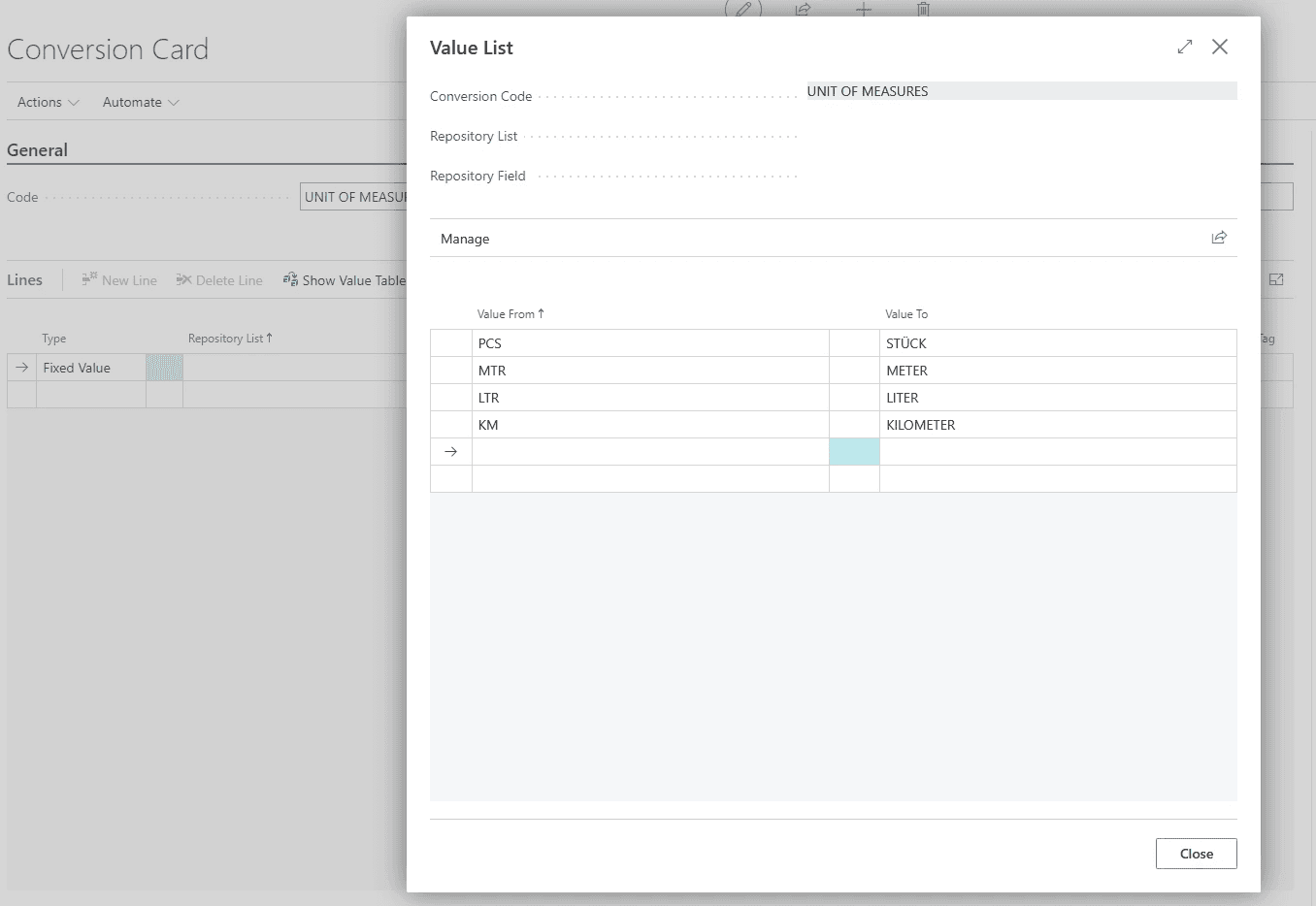
Conversion definition in COSMO ERP Data Integration Framework for data harmonization across different formats.
Curious? There are even more insights waiting for you here: DOWNLOAD FACTSHEET
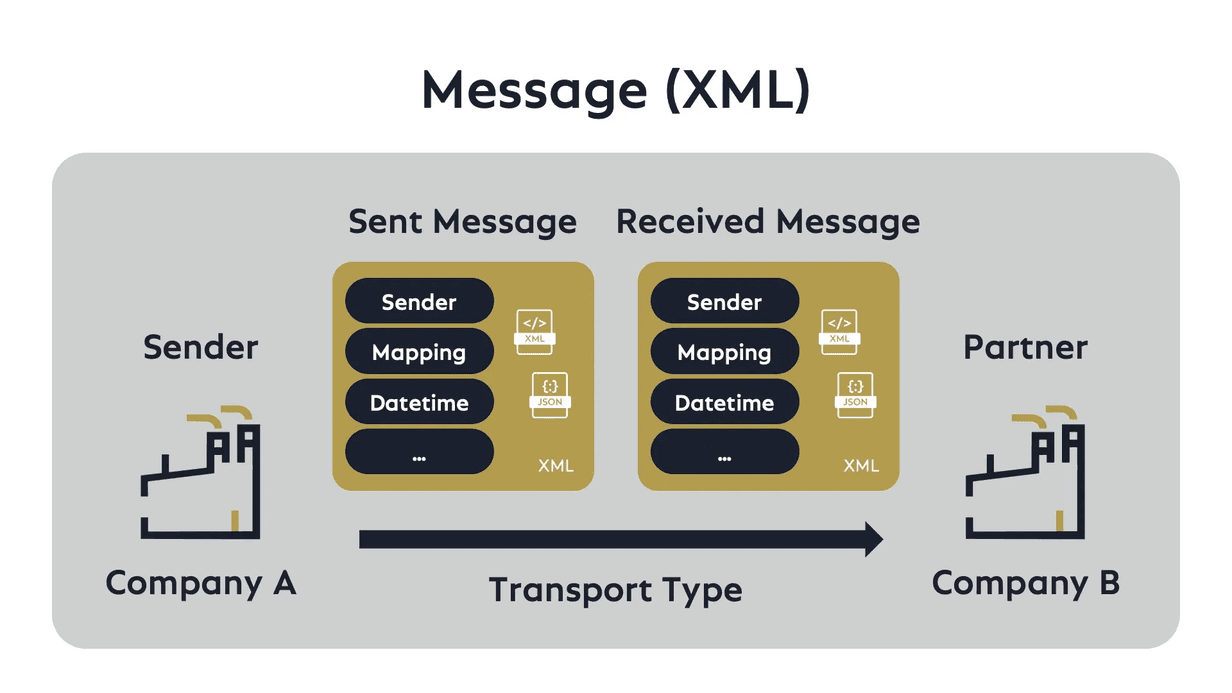
Data Management Software — Fully Integrated into Microsoft Dynamics 365 Business Central
Everything comes together right where your business runs: inside Microsoft Dynamics 365 Business Central. COSMO ERP Data Integration Framework isn't a bolt-on — it's a data management system for data harmonization that fits seamlessly into the interface your teams already know. Less integration friction, same familiar environment.
Instead of pushing data through external data management tools, data exchange, master data sync, and intercompany processes stay inside your ERP. Standard tables and custom extensions are supported equally, data silos are eliminated, and your data stays centralized and consistent.
With connections to SharePoint, Azure File Storage, and web services, Microsoft Dynamics 365 Business Central becomes the control center for your entire data integration strategy — delivering clean, traceable data flow end to end across your full process chain.





Complex data mapping made easy
Learn how the Mapping Agent analyzes data structures, suggests field mappings, and significantly speeds up the creation of integrations.

COSMO CONSULT – Your Partner for Data Integration with Business Central
Data integration is not a minor issue. Anyone taking on the challenge of sustainably connecting multiple clients, locations, or systems would be wise to work with a partner who understands this challenge. With COSMO CONSULT, you gain one of the world’s leading digital transformation experts on board—one that has been supporting Microsoft Dynamics 365 Business Central projects and complex integration scenarios for small and medium-sized businesses for over 30 years.
Together, we’ll start with a thorough analysis, define integration rules, and prioritize your use cases. This is followed by the implementation of the COSMO ERP Data Integration Framework, tailored to your system landscape. Through hands-on training , your teams will be empowered to maintain mappings and processes on their own. And with ongoing support , we won’t leave you on your own after go-live—from optimizations to support for further rollouts. This transforms modern data management software for data harmonization into a stable building block of your digital strategy for the future.
13+
Live in countries
go-to
choice for multi-entity businesses
15+
years of proven performance
Recent Awards

6x Microsoft Solutions Partner
Awarded Microsoft’s highest quality seal in all categories.
Microsoft Dynamics Inner Circle
Ranked among the top 1% of Microsoft partners worldwide every year since 2014.

Top-Employer
Among the top 0.4% of all employers in Germany.
BARC-Study 2026
Leading data and analytics partner: 11× Leader, multiple #1 rankings, and a 100% recommendation rate.
Trusted by These Companies








Frequently Asked Questions

Found what you were looking for?
Start your intelligent search now