


PDM Software Built Into Microsoft Dynamics 365 Business Central: COSMO ERP Product Data Management
Manage CAD-related product data, drawings, and revisions directly in your ERP system — for traceable changes, approvals, and clear accountability.

Product Data Management Built Into Your ERP: PDM Software for Engineering, Manufacturing, and Service
Many engineering departments still work with disconnected systems — CAD data sits in engineering, commercial information sits in the ERP. Every change brings extra back-and-forth, coordination effort, and mismatched data.
COSMO ERP Product Data Management extends Microsoft Dynamics 365 Business Central with drawing, revision, and change management capabilities. Drawings can be linked to items and bills of materials, and product information is managed centrally, available to procurement, manufacturing, and service alike. Approval rules help govern drawings and technical changes, while change orders let you manage tasks and responsibilities. Changes stay traceable, and outdated drawing versions are a thing of the past — improving collaboration and supporting strong data quality.
PDM Integration with CADLink: Bringing Technical Data Securely into Your ERP
The COSMO PDM CAD connector links more than 20 CAD, PDM, and PLM systems with Microsoft Dynamics 365 Business Central, giving you controlled transfer of technical data into your ERP system. Items, bills of materials, and drawings are synchronized bidirectionally in real time. For selected BOM positions, you control which data is imported, updated, or removed in Microsoft Dynamics 365 Business Central — so current product data is available exactly where procurement, manufacturing, and service need it.
Engineering and ERP work from the same data foundation. Information can be used across departments and carried forward into downstream processes, supporting a continuous flow of information from engineering through manufacturing and beyond.
How COSMO ERP Product Data Management Tackles Your Challenges

Controlled Data Matching Between CAD and ERP
Before product data is imported into Microsoft Dynamics 365 Business Central, items, bills of materials, and drawings can be compared against existing data — so changes can be reviewed and assessed before they flow into downstream processes.
Features like validation, mapping, and preview support a controlled matching process for technical information, keeping it clear which data is imported and how changes might affect bills of materials, item information, or other ERP-relevant areas.
This gives companies control over which product information is brought into ERP processes and used further downstream. Relevant changes can be selected, reviewed, and prepared for continued use across the organization.
Features and Functionality
Integration with CAD, PDM, and PLM Systems
Connect more than 20 CAD, PDM, and PLM systems with Microsoft Dynamics 365 Business Central.
Bidirectional, Real-Time Data Synchronization
Synchronize product data between CAD and Microsoft Dynamics 365 Business Central. In CADLink, compare CAD and ERP bills of materials and control the import of selected positions.
Centralized Change and Revision Management
Manage technical change orders with status, tasks, responsibilities, and predecessor relationships using ECN/ECO and revision history.
Transparent Status and Approval Logic
Define which drawing and revision status is approved for further use.
Search and Where-Used Functions
Find your drawings and check where they're used within product structures.
Drawing Management with Revisions and Status
Manage drawings with revisions, status, and links to items and bills of materials centrally in Microsoft Dynamics 365 Business Central.
PDM Capabilities Without Additional IT Infrastructure
COSMO ERP Product Data Management extends Microsoft Dynamics 365 Business Central with PDM capabilities — no additional hardware or separate SQL Server database required.
Take a look—here's how the system works in practice
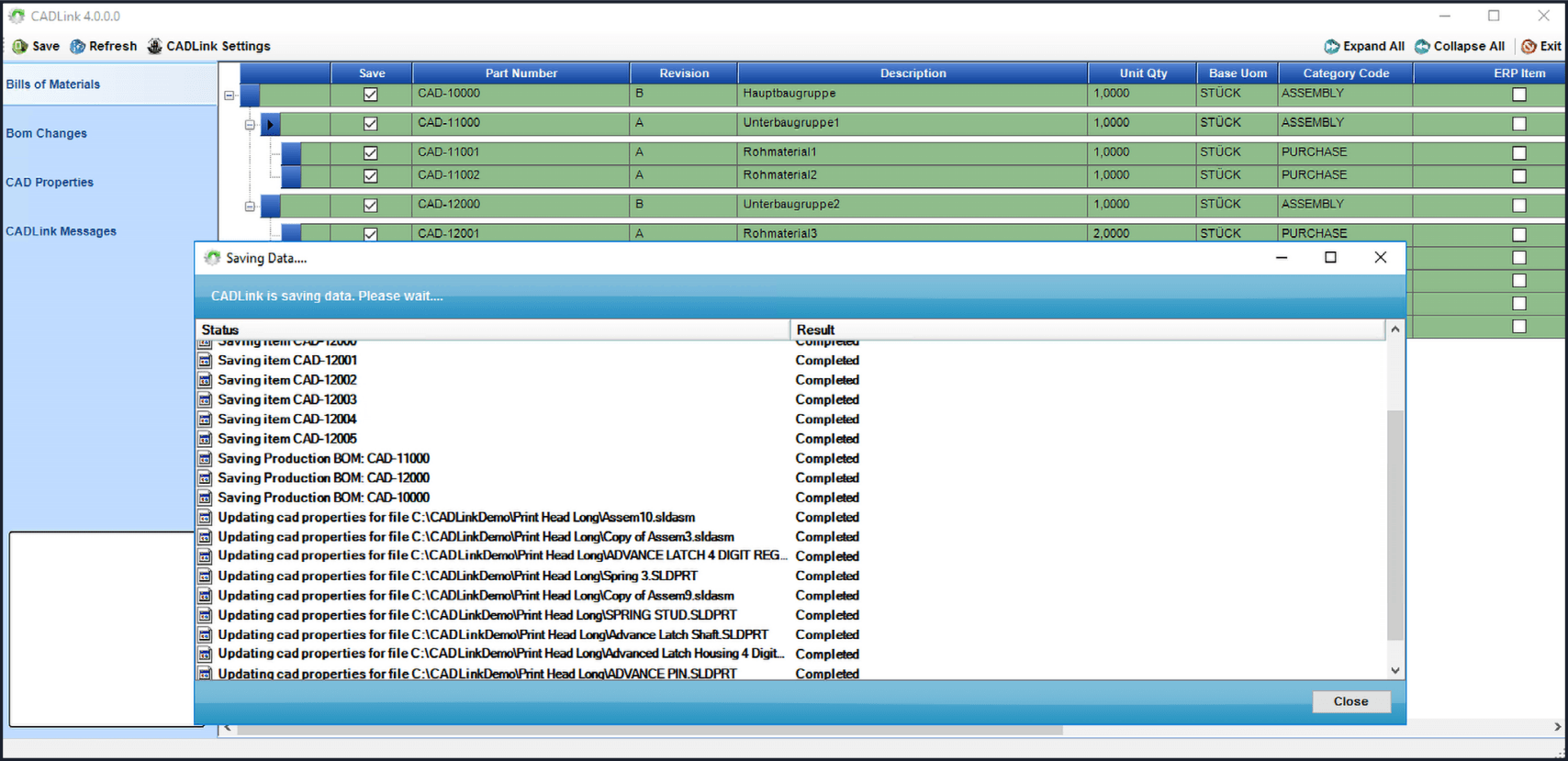
CADLink connector: bidirectional, real-time data synchronization between CAD and Microsoft Dynamics 365 Business Central
Curious? There are even more insights waiting for you here: DOWNLOAD THE FACT SHEET

Product Data Management Software Built Directly into Microsoft Dynamics 365 Business Central
Drawings, bills of materials, revisions, and approvals are all managed within your existing ERP environment. Technical product information stays right where your commercial and logistics processes already run in Microsoft Dynamics 365 Business Central.
The solution extends your existing data structures and workflows with product data management capabilities — without requiring a separate SQL Server database for PDM functionality. Users work directly in Business Central, maintaining, reviewing, and reusing product-relevant information without switching to a separate PDM environment.
CADLink by QBuild complements COSMO ERP Product Data Management as the connector for CAD, PDM, and PLM systems, enabling the exchange of technical product data between engineering and ERP and helping make development data available for further use within the ERP system.




COSMO CONSULT – Your Partner for Productive Product Data Management
Rolling out a new product data management system is no small task. With COSMO CONSULT, you get a partner by your side every step of the way — from analysis through implementation to training and support. Our experts understand the demands of the manufacturing industry and bring experience from hundreds of ERP projects.
For deep integration with your CAD, PDM, and PLM systems, we work closely with our long-standing technology partner QBuild. QBuild provides the specialized integration solution CADLink and handles the CAD-side rollout, configuration, and key-user training. COSMO CONSULT owns the ERP and process integration within Microsoft Dynamics 365 Business Central. Together, we make sure engineering and ERP work together seamlessly, so you're productive with your PDM solution from day one.
Current awards

6x Microsoft Solutions Partner
Awarded Microsoft’s highest quality seal in all categories.

Microsoft Dynamics Inner Circle
Ranked among the top 1% of Microsoft partners worldwide every year since 2014.

Top employer
Among the top 0.4% of all employers in Germany.
BARC Study 2026
Leading data and analytics partner: 11× Leader, multiple #1 rankings, and a 100% recommendation rate.
Frequently Asked Questions

Found what you were looking for?
Start your intelligent search now