


Microsoft 365 Copilot: AI that makes your daily work easier
Use Microsoft 365 Copilot directly in Outlook, Teams, Word and more to automate routine, repetitive chores, freeing you up for the real work.

What is Microsoft 365 Copilot?
Sound familiar? You're itching to brainstorm ideas, push projects forward, and build your company's tomorrow, but daily drudgery eats your time. Good news: There's a fix.
Microsoft 365 Copilot helps you with writing emails, structuring reports and preparing presentations. Your digital assistant is always there, no matter which app you are working in: in Word, Outlook or PowerPoint. You can use the tools you are familiar with and get help directly. Tasks that used to waste time become almost effortless, leaving you free to focus on what really matters.
And the best thing is that Copilot can do much more than an ordinary chatbot. Embedded in your HR, sales or project processes, Copilot drafts emails, offers and evaluations. It uses existing company knowledge, automatically links relevant information and presents it to you. This frees up valuable time for your team to focus on what really matters: personal customer care, new projects and fresh ideas for the future.

Digital work environments that adapt and evolve
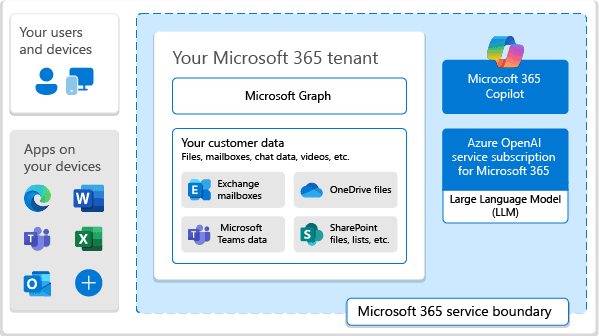
With a Microsoft 365 Copilot license, you can create productive work environments that grow with your company. Supported by Azure OpenAI and Microsoft Graph , the intelligent assistant brings together content from emails, files, chats and appointments to provide clear answers and helpful suggestions. Copilot agents take over recurring tasks such as regular summaries or automatic reminders.
At COSMO CONSULT, we help you to make the most of these opportunities. We will work with you to find out where artificial intelligence can make the biggest difference in your everyday work. We introduce your team to the new technology at the right pace and ensure that data protection and security are maintained. Your team will be able to find information more quickly and prepare decisions more easily. This creates a solid foundation on which you can build your own extensions and specialized copilots.
How Microsoft 365 Copilot helps you master the challenges you face

Targeted optimization of business processes with co-pilot agents
Copilot agents in Microsoft 365 are tailored helpers that jump on recurring chores right where they pop up, like meeting recaps, gentle reminders, and quick data rundowns that eat up hours. Set the rules once, and let your digital sidekick handle the grind. Now you can zero in on projects while the busywork hums along behind the scenes.
We work with you to find the areas where Copilot agents bring real benefits: be that in the search for new team members, in your service processes, in project management or contract management. We build custom Copilot agents using Microsoft 365 integration and Power Platform that are tailored to your data and workflows. Reliable sidekicks that make your daily operations smoother and faster.
Intelligent functions at a glance
AI support in Outlook, Teams, Word, Excel and PowerPoint
Microsoft 365 Copilot works closely with your familiar Microsoft 365 apps. Emails, documents, presentations, spreadsheets, and chats can be enhanced with suggestions, summaries, and analyses without the need for additional tools or logins.
Use of Azure OpenAI and large language models (LLMs)
Microsoft 365 Copilot is based on large language models in the Azure OpenAI service. This allows you to benefit from ongoing improvements without having to operate or train your own models.
Copilot agents automate recurring tasks
Specialized Microsoft 365 Copilot agents take over tasks such as reminders, regular summaries and evaluations. They can be flexibly adapted to new processes and support long-term automation strategies in your company.
Extensible via Copilot Studio and Power Platform
With Microsoft 365 Copilot Studio, Power Apps, Power Automate and Power BI, you can develop your own Copilot agents, workflows and dashboards. This allows you to build a customized AI layer around your business processes without changing the Microsoft 365 platform itself.
Integrated security and compliance functions from Microsoft
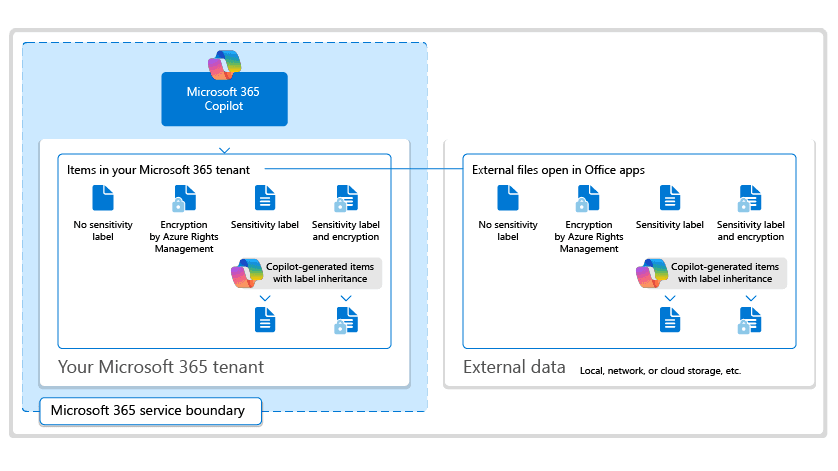
Microsoft 365 Copilot uses existing security and compliance services such as Microsoft Purview, Entra ID and Defender. Data access follows existing authorizations, content remains in your tenant's region and is processed in encrypted form.
Microsoft 365 Copilot Chat with email and Teams context for productive work.
How to make full use of Microsoft 365 Copilot while remaining legally compliant
With Microsoft 365 Copilot, the topic of governance takes center stage: Who is allowed to see what content? How is information reliably categorized? What guidelines apply when working with AI? A clear set of rules is key to taking full advantage of Copilot and keeping your data secure and compliant at all times.
Our team supports you with governance workshops, authorization analyses and recommendations for data governance in Microsoft 365. We'll work with you to review roles and access permissions and tailor them to work seamlessly with Copilot. This ensures that everything stays within your company's policies and that your team can have fun discovering new possibilities.
Working with Microsoft 365 Copilot: Connected, fast and absolutely secure
Microsoft 365 Copilot is solidly integrated into your familiar working environment. E-mails, files, conversations and appointments are linked via Microsoft Graph so that all your important information is available exactly when your team needs it. Just like that, without copying data or laboriously transferring it to other programs.
Closely integrated with Microsoft Dynamics 365, Power Platform and other applications, you have a digital environment where everything runs smoothly. Security is guaranteed at all times, because Copilot only accesses content for which authorization has been granted. This ensures that all applicable data protection rules are observed. At the same time, your company benefits from a unified data management system without data silos, laying a strong foundation for further optimizations, for example, with specialized Copilot agents and other solutions for specific fields.

COSMO CONSULT
Your partner for Microsoft 365 Copilot and AI implementation
Our specialists are just as familiar with modern technologies as they are with your daily business processes. We review your setup to pinpoint Copilot's biggest wins, then craft a custom rollout plan, from idea to go-live with your AI sidekick.
Our experts are with you every step of the way: we assist you with the technical setup, conduct joint workshops, supervise pilot projects and the rollout throughout the company. In practical training sessions, everyone in the team learns how to use the digital assistant effectively in their everyday work. At the same time, we keep an eye on important issues such as security and scalability for you. In this way, Copilot becomes a valuable productivity factor that will be an engine for the growth of your company in the long term.
Current awards

6x Microsoft Solutions Partner
In allen Kategorien ausgezeichnet mit Microsofts höchstem Qualitätssiegel.
Microsoft Dynamics Inner Circle
Seit 2014 jedes Jahr unter den Top 1 % Partnern weltweit.

Top-Arbeitgeber
Unter den besten 0,4 % aller Arbeitgeber in Deutschland.
BARC Study 2026
Leading Data & Analytics Partner: 11× Leader, multiple #1 rankings, and a 100% recommendation rate.





Frequently Asked Questions

Found what you were looking for?
Start your intelligent search now